
AUTOMATION TOOLS / 13 MIN READ
How Marketing Automation Saves Small Teams 20 Hours a Week
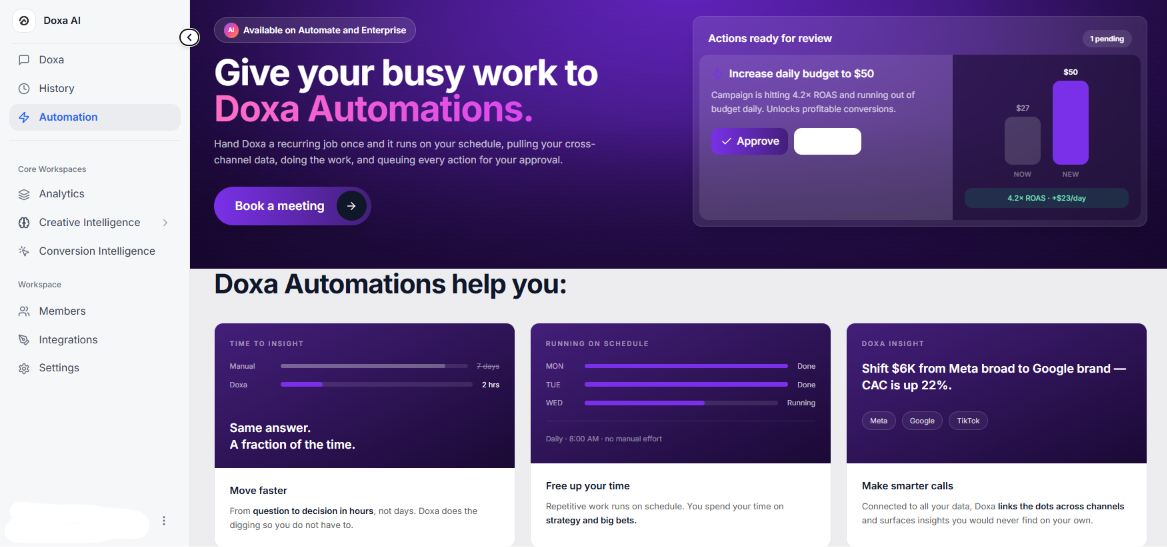
Marketing automation saves time by handling repeatable tasks such as reporting, lead routing, lifecycle emails, and cross-app data entry. Twenty hours a week is not a guaranteed result: measure your team’s manual workload, subtract the review and maintenance time, and redirect the time saved into better marketing decisions.
Marketing automation frees up a small team's week by removing the specific tasks that don't need a human doing them by hand: pulling performance numbers into a spreadsheet, tagging and routing leads, sending the same follow-up message, or checking several ad accounts for what changed overnight. None of this requires judgment — automation does it faster and without the error rate that creeps in by Friday afternoon. What it gives back isn't a fixed number of hours; it's time redirected to the handful of things a small team actually needs a human for: deciding which creative to scale, which segment to message differently, and which account needs attention today.
Predoxa, Gooseberry's own product, is one example of what this looks like in practice. Instead of a marketer manually pulling creative performance from Meta Ads, Google Ads, Shopify, and GA4 into separate tabs each week, Predoxa brings those creatives and their performance metrics into one workspace, organized so a team can see creative momentum at a glance rather than reconstructing it from four exports. The manual version of that task is a recurring data-compilation job; the automated version is a short review. The time isn't eliminated from the business — it's moved from compiling data to deciding what to do with it.
That's the honest version of "automation saves time": it doesn't invent free hours out of nowhere, and a team that automates lead tagging without fixing a slow follow-up process won't feel much different. What it does is take specific, repetitive, low-judgment tasks off a small team's plate so the people on it spend their week on the decisions only they can make. The rest of this guide walks through which tasks are the best candidates, and how to tell if automation actually worked for your team.
The Problem: A Small Team's Week Gets Eaten by Repetition
A small marketing team — one to four people, often wearing several hats at once — doesn't lose its week to strategy. It loses it to the same handful of repetitive tasks, done by hand, over and over:
-
Pulling weekly or monthly numbers from Meta Ads, Google Ads, Shopify, and GA4 into a spreadsheet or deck before anyone can start analyzing them.
-
Manually tagging and routing leads that come in through a form, a DM, or a call, then remembering to follow up with each one on time.
-
Sending the same onboarding, cart-abandonment, or re-engagement email one at a time because no sequence exists yet.
-
Copying data between tools — a form submission that needs to become a CRM contact, a task, and a notification — because nothing is connected.
-
Checking several ad accounts or dashboards every morning just to see what moved, with no alert if something broke overnight.
None of this is strategic work. It doesn't require a decision about audience, creative, or budget — it's clerical, and it's exactly the kind of task that doesn't scale with a small headcount. A team of two can run one campaign's worth of manual reporting without much pain. The same team running reporting, lead routing, and email sends across several clients or product lines hits a wall — not because the work is hard, but because there isn't enough week left for judgment work once the clerical work is done.
This is where "automation saves time" claims usually go wrong: they promise a number without naming the task. The honest version is narrower and more useful: tasks with no judgment step are strong automation candidates, because removing the manual labor doesn't remove any decision-making. Tasks that do involve judgment — choosing which lead is worth a personal call, deciding whether a creative is actually underperforming or just new — are worse candidates, because automating them removes a decision a human should still be making.
The rest of this guide focuses on the first category: specific, repeatable, low-judgment tasks that are common across small marketing teams, what automating them actually looks like, and how Predoxa and other tools fit into that picture.
Three Common Automation Patterns
These are three widely implemented patterns, not a specific client log. If one matches something your team has actually built, it becomes a real example for you to point to; if not, treat it as a template to adapt — not as a promise of a fixed number of hours.
1. Lead capture → tagging → follow-up
Manual version: A lead fills out a form. Someone checks an inbox or spreadsheet, reads the submission, decides what service or source it's tied to, tags it by hand, and either follows up themselves or assigns it to someone who will — assuming nobody forgets, and assuming it happens the same day rather than two days later when the lead has gone cold.
Automated version: The form submission triggers an automation that creates or updates the contact record, tags it by source and service automatically, assigns an owner based on rules, and kicks off a follow-up sequence (email, SMS, or an internal task) within minutes. The team's involvement moves from "process every lead by hand" to "review and personalize the leads the system has already sorted."
This is the easiest pattern to explain and the easiest to audit: count how many leads came in last month, and how many got a same-day first touch. That gap is the manual cost this pattern removes.
2. E-commerce lifecycle email flows
Manual version: Cart abandoners, first-time browsers, and post-purchase customers all get the same generic email blast, or nothing at all, because building a one-off email for each behavior takes longer than most small teams have time for.
Automated version: A platform like Klaviyo triggers segmented flows automatically based on behavior — cart abandonment, browse abandonment, post-purchase, win-back — with timing and content rules set once and running continuously. The team's work shifts from "write and send an email every time something happens" to "write the flow once, then monitor and refine it."
This pattern is strongest for e-commerce clients specifically, where behavioral triggers are frequent and the revenue impact of a missed cart-recovery email is easy to see.
3. Cross-app workflow automation
Manual version: Data moves between tools by hand — a form submission gets copied into a CRM, a CRM update gets copied into an email tool, a new customer gets manually added to a task list — with every copy-paste step a chance for a typo, a missed step, or a delay.
Automated version: A connector like Zapier or Make moves the data automatically: one trigger fires the next tool, which fires the next, with no manual re-entry and a log of what happened. This pattern applies almost everywhere two or more tools need to stay in sync, which is why it tends to be the first automation most teams build.
Across all three, the pattern is the same: find the step where a person is doing something a rule could do, and let the rule do it. The judgment stays with the person; the repetition doesn't.
Where Predoxa Fits
Predoxa is Gooseberry's customer-facing product, and it's a useful example of what a small-team automation stack looks like in one specific area: creative performance.
The manual version of this work is familiar to anyone running paid social for more than one client or product line. Ad creatives live inside Meta Ads Manager. Performance numbers live inside platform dashboards, sometimes a BI tool, sometimes a spreadsheet someone rebuilds every week. Shopify and GA4 data live somewhere else again. Reviewing "which creative is actually working" means pulling all of that together by hand before anyone can even start deciding what to test next or where to shift budget.
Predoxa brings individual creatives and their performance metrics into one workspace, with categories for reviewing creative momentum and tools for organizing the analysis. Instead of exporting four data sources into a deck before a Monday review, a team opens one workspace and sees the creatives alongside their performance. The value isn't that the data moves faster than a person could move it by hand — it's that the comparison step, deciding what deserves further testing, further spend, or a pause, happens without first reconstructing the picture from scratch.
It's worth being precise about what this is and isn't. This is an example of the kind of specialized workflow Predoxa's own product supports — not a claim that general-purpose tools like Zapier, Make, a BI dashboard, or Triple Whale can't be configured to do something similar. Plenty of teams build their own version of this with other tools, and for some setups that's the better fit. What Predoxa does differently is bundle that specific workflow — creative-to-performance mapping across Meta, Google, Shopify, and GA4 — as a dedicated, ready-made view rather than something a team assembles and maintains itself.
For a small team specifically, that distinction matters more than it would for a larger one. A five-person growth team might reasonably justify the time to build and maintain a custom dashboard. A one- or two-person marketing function usually can't — not because the work is beyond them, but because maintaining a custom reporting stack is itself one more repetitive task competing for the same limited hours this whole guide is about. Using a product built for the specific workflow, rather than assembling general-purpose tools into something that approximates it, is itself a time decision, not just a tooling one.
This is also where Gooseberry's two-sided position becomes relevant: the company builds and uses Predoxa internally for its own client work, and separately builds custom software for businesses whose automation needs don't match an existing product. Which path fits better — an existing tool, a connected stack, or custom software — is the subject of Gooseberry’s guide to choosing, building, and implementing automation tools.
What the Real Case Studies Show (Reframed Honestly)
None of Predoxa's documented case studies measure time saved directly — they measure what happened to revenue, cost-per-conversion, and retention once a specific manual bottleneck was fixed. That's still relevant here, because in each case the fix was the same shape as the patterns above: find the repetitive, rules-based step and automate it.
Hire A Fractional had over 22,000 high-intent leads sitting in the account with less than 0.37% of spend going to retargeting them — a sorting problem, not a creative or budget one. Building proper cold/warm/hot audience exclusions and dedicated retargeting (automating the targeting logic rather than managing it manually per campaign) produced 3× lower cost-per-conversion on warm audiences and a projected 40–60% efficiency gain without increasing spend.
Prime Streetwear NY combined product segmentation, negative keyword cleanup, and automated retention flows — dynamic retargeting, SMS/email restock alerts, VIP rewards — replacing what would otherwise be manual, one-off messaging. Revenue grew 4.2× and ROAS went from 4.67× to 8.17×.
Glow & Smile fixed a structural problem (US and UK audiences mixed in the same campaigns) by restructuring and isolating segments — a one-time setup that then ran without ongoing manual rebalancing. Conversion value rose 27%.
Dancelib rebuilt onboarding and ran persona-based campaigns by segment instead of treating all freemium users the same, taking the platform to 11,000+ users and 2,500+ paid subscribers at 3× ROAS.
The pattern across all four: the manual alternative to each fix wasn't "do nothing," it was "keep doing the same work by hand, less precisely, because no one has time to segment, exclude, or route traffic manually at that level of detail." The revenue and efficiency numbers are what happens downstream of freeing that capacity — they're not a time-saved metric, but they're evidence that the capacity automation frees up gets spent on something that moves the business, not just on fewer hours worked.
That's the more honest claim this guide can make: automation's value shows up in what a team does with the time it gets back, and in these four cases, that was consistently measurable. A team that automates a task and does nothing different with the freed-up time won't see these results. A team that redirects that time into the segmentation, targeting, and sequencing decisions above might.
How to Measure Your Own Time Savings
Rather than trusting an industry number, a small team can measure this directly in a few steps:
-
Pick one task, not the whole function. "How much time does automation save on marketing" is unanswerable. "How much time does the team spend tagging and following up on inbound leads" is answerable.
-
Time it manually for two weeks before changing anything. Track actual minutes spent on the task, not an estimate after the fact — people reliably underestimate repetitive work because no single instance feels long.
-
Automate the task, then time what remains. After automation, the task usually doesn't disappear — it shrinks to a review-and-exception step. Time that step the same way.
-
Compare the two numbers, and account for setup and maintenance. A workflow that took three hours a week manually and now takes twenty minutes a week to review is a real weekly gain — minus whatever time goes into maintaining the automation itself (fixing a broken Zap, updating a sequence, reviewing edge cases).
-
Ask what replaced the freed time. This is the step most "automation saves X hours" claims skip. If the freed time went into more campaigns, better segmentation, or faster follow-up, that's a result worth measuring on its own terms — revenue, conversion rate, response time — separate from the hours figure.
This is also the honest answer to "will automation save my team 20 hours a week?" It depends entirely on how many hours that team was spending on automatable tasks in the first place. A solo marketer manually compiling reports for ten accounts has a lot more to reclaim than a two-person team that's already using a CRM's built-in automations. The number isn't fixed — the method for finding your own number is.
FAQ
Does marketing automation really save a small team 20 hours a week?
Not as a fixed, universal number. The actual time saved depends on how many hours a team was already spending on automatable, low-judgment tasks — reporting, lead tagging, repetitive email sends. A team with heavy manual reporting across many accounts can plausibly reclaim that much; a team with little repetitive work to begin with won't.
Which tasks should a small team automate first?
Tasks with no judgment step: data compilation, lead tagging and routing, triggered email sequences, and moving data between connected tools. Tasks that require a human decision — which lead to call personally, whether a creative is really underperforming — are poor first candidates.
What's the difference between automation and just using more software?
Automation removes a manual step by having a rule or trigger do it instead of a person. Simply adding more software without connecting it to a trigger just adds another tool someone has to check manually — it doesn't save time on its own.
Is Predoxa a general marketing automation tool?
No. Predoxa is Gooseberry's product for a specific workflow: bringing ad creatives and their performance data from Meta Ads, Google Ads, Shopify, and GA4 into one workspace for review. It isn't a replacement for a CRM, an email platform, or a general iPaaS tool like Zapier or Make.
How do I know if automation actually worked for my team?
Time the task manually before automating it, then time the review-and-exception step that remains afterward, and account for ongoing maintenance. If the gap is real and the freed time went somewhere — more output, faster follow-up, better targeting — it worked. If the task just moved rather than shrank, it didn't.
The Honest Takeaway
"Marketing automation saves small teams 20 hours a week" makes a good headline and a bad promise. The real claim is smaller and more useful: a handful of specific, repetitive, low-judgment tasks — reporting, lead routing, lifecycle email, cross-app data entry — can be automated without losing any decision-making, and doing so frees up real time. How much time depends entirely on how much manual, automatable work a team was doing in the first place, which is a question only that team can answer for itself.
What's consistent across Predoxa's own case studies isn't a time figure — it's that every one of them involved automating a specific bottleneck (audience exclusions, retention segmentation, onboarding flows) and that the freed-up capacity went somewhere measurable: lower cost-per-conversion, higher ROAS, more retained customers. That's the pattern worth copying, more than any specific hours claim: find the repetitive step, automate it, and be deliberate about what the team does with the time it gets back.
If reporting and creative performance tracking is the task eating your team's week, Predoxa is built for exactly that. If the bottleneck is somewhere a ready-made tool doesn't fit, that's what Gooseberry's custom software development work is for. Either way, the first step is the same: name the task, time it honestly, and decide if it's worth automating — before assuming the hours.
Put Your Repetitive Marketing Work on Autopilot
Explore Predoxa automation for recurring marketing workflows: schedule cross-channel data collection and repetitive tasks, then review queued actions before approving them. Start with one recurring job, measure the time it takes today, and see how much work remains after automation.
Want to see how it fits your team? Explore the product and demo options on Predoxa’s automation page. For workflows that need custom software, talk to Gooseberry.
/ Gooseberry
"We don't build tools to impress. We build tools to perform."
Explore Automation Products